

Managing a business in 2025 feels like taming a storm. Sales, inventory, finances—everything’s moving fast. That’s where ERP software saves the day. It pulls all your operations into one tidy system. No more headaches. Just smooth workflows and more intelligent decisions.
Different ERP software fits different needs, from small shops to global giants. Cloud-based tools and AI boosts make them sharper than ever. In 2025, picking the right ERP can skyrocket your growth. This article explores the best ERP software out there. We’ll dive into what makes each one unique, spotlight 2025’s top trends, and help you find the perfect match for your business. Get set to simplify your work and thrive in the digital race!
What Is ERP Software?
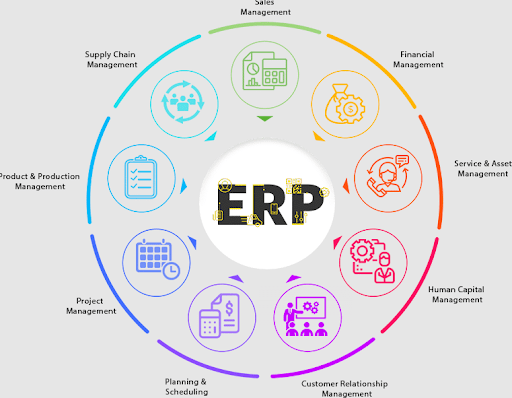
Need to simplify your business? ERP software is your answer. It brings your accounting, inventory, sales, and HR into one smooth system. You get a central hub that keeps data organized and easy to access.
This cuts errors, saves time, and streamlines your work. With real-time updates, you make smart decisions fast. Whether you run a small startup or a large factory, ERP keeps your operations flowing and supports your growth in 2025’s fast-paced world.
Types of ERP Software
Choosing the right ERP software starts with knowing your options. You’ve got four main types, each designed to fit specific business needs. Here’s a breakdown to help you find what works best for your operations.
1. Cloud-Based ERP
With cloud-based ERP, like NetSuite, you get fast setup and access from anywhere. Updates happen automatically, and costs stay low. It’s ideal for small businesses or startups, especially in retail, that need flexibility without heavy spending.
2. On-Premise ERP
Need full control? On-premise ERP, like SAP ECC, runs on your servers. You can customize it to match complex operations, like manufacturing. It’s great if you have an IT team, but expect higher upfront costs.
3. Hybrid ERP
Want the best of both worlds? Hybrid ERP combines cloud and on-premise features. You store sensitive data on-site for security while using cloud tools for mobility. It suits distributors or businesses transitioning to cloud setups.
4. Open-Source ERP
Like to customize? Open-source ERP, like Odoo, lets you tweak the code. It’s budget-friendly for small businesses with tech skills, like eCommerce, though the setup takes effort.
Each type offers distinct benefits. Match one to your goals, and your business will run smoother.
Top ERP Software Systems in the Market
Looking to supercharge your business operations? The right ERP system can unify your finances, inventory, and more, saving you time and boosting growth. In 2025, the ERP market is packed with standout solutions, from heavyweights like SAP to budget-friendly options like Odoo. Whether you run a small shop or a global enterprise, you’ll find a tool that fits. Here’s your guide to the top ERP systems ruling the market, with details to help you choose wisely.
1. SAP S/4HANA
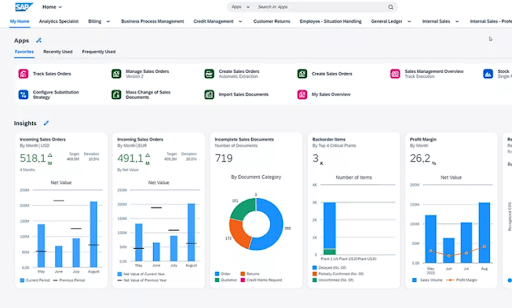
SAP S/4HANA is a beast of an ERP, built for big businesses that need speed and precision. It is an in-memory database that crunches data in real time, giving you instant insights to stay sharp. It ties finance, supply chain, and manufacturing into one seamless system, perfect for complex operations. The AI tools predict trends and automate tasks, saving you hours. It connects effortlessly with SAP products and other apps, scaling as your company grows. Yes, it’s pricey, but for enterprises tackling massive data, it’s a powerhouse worth every penny.
Key Features:
- Real-time analytics for instant insights.
- AI-driven tools for smarter forecasting.
- Modules for finance, supply chain, and manufacturing.
- Fiori interface for customizable dashboards.
Best For: Big manufacturers or distributors needing robust, enterprise-grade systems. Expect higher costs and setup time, but the control is unmatched.
Pricing: Quote-based, often thousands monthly. Implementation costs add up.
2. Oracle NetSuite
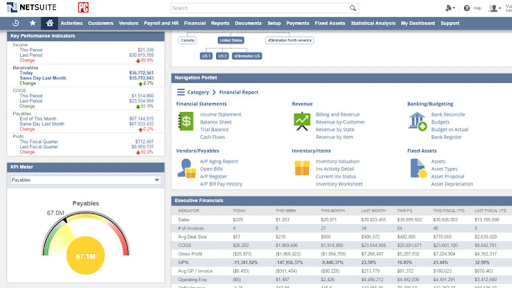
Oracle NetSuite is your all-in-one ERP, a cloud-based champ that keeps growing businesses on track. It handles accounting, inventory, CRM, and eCommerce like a pro, with real-time data to make smart calls fast. The dashboards are clean and simple, letting you dive into insights without a headache. Its AI automates tasks like billing, freeing up your team. NetSuite’s a rockstar for global firms, juggling multiple currencies and locations effortlessly. It links up with tools like Shopify and Salesforce, perfect for companies scaling quickly. The cost can bite, but its versatility makes it worth the investment for ambitious teams.
Key Features:
- Real-time dashboards for tracking performance.
- Inventory management to streamline stock.
- Financial tools for fast reporting and compliance.
- Seamless integrations with third-party apps.
Pricing: Starts at ~$999/month, plus per-user fees. Custom quotes available.
Best For: Small to medium businesses in retail or e-commerce wanting flexibility. Pricing starts around $1,299/month plus $99/user/month.
3. Microsoft Dynamics 365 Business Central
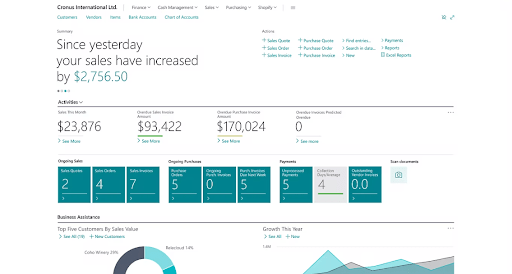
You’re running a small or mid-sized business and need an ERP that’s simple yet powerful—meet Microsoft Dynamics 365 Business Central. This cloud-based tool pulls your accounting, inventory, sales, and operations into one tidy hub. You’ll love its familiar Microsoft look, especially if you’re already on Office 365.
Real-time reports let you spot trends fast, and AI tools like Copilot handle forecasting for you. It syncs perfectly with Teams and Power BI, so your team stays connected and informed. Best of all, it’s budget-friendly and quick to set up, giving you big ERP perks without breaking the bank. You’ve got a winner here for keeping things smooth and efficient.
Key Features:
- Finance and supply chain automation.
- AI-powered forecasting for better planning.
- Mobile access for on-the-go management.
- Integration with Microsoft 365 and Power BI.
Price: Costs start at $70–$100/user/month, making it budget-friendly.
Best For: SMEs in services or manufacturing using Microsoft products.
4. Odoo

You’re a small business owner looking for an ERP that’s flexible and won’t drain your wallet—Odoo’s got your back. This open-source platform lets you pick from dozens of apps, like accounting, inventory, or eCommerce, to build a system that fits your needs. You’ll find its drag-and-drop interface a breeze to customize, no coding required.
Real-time inventory updates keep your stock in check, and it connects with tools like PayPal and Shopify. You can start for free with the community version or go cloud for extra support. Odoo grows with you, making it a smart pick for startups ready to scale without the hefty price tag.
Key Features:
- Drag-and-drop website builder for online stores.
- eCommerce tools to boost sales.
- Customizable workflows for your processes.
- Community support for ongoing updates.
Price: Free for self-hosted setups; ~$24.90/user/month for hosted plans.
Best For: Small businesses or startups in eCommerce needing a tailored, affordable solution. Some tech know-how helps with setup.
5. Sage Intacct
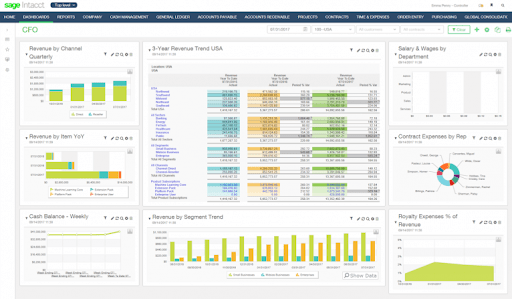
You’re managing a business where finances are the heartbeat, and Sage Intacct is your secret weapon. This cloud-based ERP shines in accounting, pulling your invoicing, budgeting, and cash flow into one slick system. You’ll zip through reports with real-time dashboards, spotting trends without breaking a sweat.
Its AI automates tasks like accounts payable, saving you hours. They connect seamlessly with Salesforce and ADP, keeping your data in sync. You get a scalable solution that grows with you, plus AICPA approval for rock-solid compliance. It’s not cheap, but for finance-focused firms, it’s a no-brainer to stay sharp and efficient.
Key Features:
- Automated invoicing and payroll processing.
- Budgeting tools for financial planning.
- Multi-entity management for complex organizations.
- Real-time reporting for clear insights.
Price: $8,000–$50,000/year, depending on modules and users.
Best For: Mid-sized firms in healthcare or nonprofits needing strong financial tools. Pricing ranges from $8,000–$50,000/year.
6. Epicor Kinetic Content
Running a manufacturing business demands an ERP that speaks your language—Epicor Kinetic delivers. This cloud-first platform nails supply chain, production, and order management, giving you real-time insights to stay ahead. Dashboards make tracking inventory and schedules a breeze. AI handles repetitive tasks like order processing, so your team focuses on what matters.
Built for industries like aerospace or electronics, it tackles complex, make-to-order projects with precision. It syncs with CRM and analytics tools, keeping everything connected. Choose cloud or on-premises deployment to suit your needs. Setup costs can sting, but for manufacturers, this tool’s a game-changer for streamlining operations.
Key Features:
- Production planning for efficient workflows.
- Inventory control to optimize stock.
- AI-driven analytics for smarter decisions.
- Bill of materials for complex manufacturing.
Price: Quote-based, typically $125–$500/user/month, depending on customization.
Best For: Mid-sized manufacturers needing industry-specific tools. Quote-based pricing suits custom needs but can be steep.
7. SYSPRO Content
Need an ERP that’s a manufacturing pro? SYSPRO steps up, built to streamline your production and distribution. This modular platform handles accounting, inventory, and supply chain with ease, delivering real-time data to keep you in control. Its clean interface lets you customize reports without a fuss. Automation tackles tasks like order tracking, freeing your team for bigger goals.
Perfect for industries like automotive or food, it supports complex processes and integrates with tools like Microsoft 365 or Tipalti for payments. Cloud, on-premises, or hybrid—pick what fits you. Costs add up, but for manufacturers, it’s a reliable choice to boost efficiency.
Key Features:
- Warehouse management for streamlined operations.
- Financial tools for accurate reporting.
- Avanti web interface for mobile access.
- Predictive analytics for better planning.
Price: Starts at ~$199/user/month, depending on modules and deployment.
Best For: Manufacturers or distributors wanting scalability. Pricing starts at $199/user/month, balancing cost and power.
Comparison Table
Looking to supercharge your business in 2025? Our comparison of top ERP systems helps you pick the perfect fit. From cloud-based champs to industry-specific stars, these tools streamline operations and boost growth. Compare deployment, pricing, and more to find the ERP that powers your success.
| ERP System | Deployment | Target Business Size | Industry Fit | Pricing Model | Customizability |
| SAP S/4HANA | Cloud, On-Premise, Hybrid | Large Enterprises | Manufacturing, Distribution, Finance | Quote-based, typically $200–$1,000/user/month | High (extensive modules, complex coding) |
| Oracle NetSuite | Cloud | Small to Large | Retail, eCommerce, Services | Subscription, $1,299/month + $99/user/month | High (single codebase, seamless upgrades) |
| Microsoft Dynamics 365 Business Central | Cloud, On-Premise | Small to Mid-Sized | Services, Manufacturing, Retail | Subscription, $70–$100/user/month | Moderate (Visual Studio, C#, X++ coding) |
| Odoo | Cloud, On-Premise | Small to Mid-Sized | eCommerce, Retail, Startups | Free (self-hosted); ~$24.90/user/month (hosted) | High (30+ apps, open-source flexibility) |
| Sage Intacct | Cloud | Mid-Sized | Healthcare, Nonprofits, Finance | Subscription, $8,000–$50,000/year | Moderate (financial-focused, add-ons) |
| Epicor Kinetic | Cloud, On-Premise | Mid-Sized | Manufacturing, Distribution | Quote-based, $125–$500/user/month | High (industry-specific, tailored modules) |
| SYSPRO | Cloud, On-Premise, Hybrid | Small to Mid-Sized | Manufacturing, Distribution | Subscription, ~$199/user/month | High (modular, customizable workflows) |
Trends Shaping Software in 2025
In 2025, software is evolving quickly to meet new business needs. Companies want systems that are smart, flexible, and easy to use. These major trends are shaping how software is built and used:
1. AI and Automation:
Artificial Intelligence is now a key part of many tools. From chatbots that handle customer service to systems that analyze large sets of data, AI saves time and reduces mistakes. Automation handles routine tasks like invoicing, reporting, and follow-ups, helping teams focus on more important work.
2. Cloud-Based Solutions:
Cloud software is in high demand. It allows teams to access data from any device, work remotely, and update information in real-time. Cloud tools also reduce hardware costs and make scaling up easier as businesses grow.
3. Low-Code and No-Code Platforms:
These platforms let users build apps and workflows without deep coding knowledge. They speed up development and reduce the need for large IT teams. This helps businesses respond faster to changing needs and test new ideas quickly.
4. Data Security and Privacy:
With more data stored online, security is a top concern. New software comes with built-in features like encryption, two-factor authentication, and regular backups. These tools protect data from hacks, leaks, and loss.
5. Easy Integration with Other Tools:
Today’s software must connect well with other systems like CRMs, accounting tools, and e-commerce platforms. Smooth integration reduces manual work and ensures all systems share the same data.
6. User-Friendly Design:
Simple, clean interfaces are now a priority. Software is built to be easy for everyone to use, not just tech experts. This reduces training time and boosts productivity.
These trends are setting new standards for business software. Companies that follow them are more likely to stay competitive and efficient.
Choosing the Right ERP for Your Business
Ready to pick an ERP that turbocharges your growth? Choosing the right system in 2025 means matching your business needs with the perfect tools. With 69% of companies adopting ERP for efficiency, focus on these key factors to find a solution that scales with you and sparks success. Synergy Technology Solutions W.L.L. offers expert implementation services, delivering custom modules to ensure your ERP aligns perfectly with your operations
The right choice depends on size, industry, and specific needs. Picking the right ERP helps improve daily operations and long-term growth. Here are key factors to consider:
1. Business Size and Budget:
Small businesses may need simple, affordable solutions. Large companies might require complex systems with advanced features. Choose software that fits current needs but can also grow with the business.
2. Industry Requirements:
Some ERP systems are designed for specific industries like manufacturing, retail, or healthcare. These offer tools that match the workflow, regulations, and common challenges of that field.
3. Features and Modules:
Focus on what the business actually needs—finance, inventory, HR, CRM, or all of them. Avoid overpaying for features that won’t be used.
4. Ease of Use:
A good ERP should be easy to learn and navigate. If the system is too complex, employees may struggle to use it effectively.
5. Integration with Other Tools:
Make sure the ERP works well with existing software—email, accounting, e-commerce, etc. Good integration saves time and avoids data errors.
6. Cloud vs. On-Premise:
Cloud ERP allows access from anywhere and usually costs less upfront. On-premise ERP offers more control but needs more IT support. Choose based on how the business operates.
7. Vendor Support and Updates:
Reliable customer support, training, and regular updates are important. A strong vendor relationship ensures smooth setup and long-term use.
Choosing the right ERP is a big step. A clear list of needs and goals helps in making the best decision.
Conclusion
ERP software transforms businesses in 2025, streamlining operations with cloud, AI, and industry-specific tools. From SAP’s power to Odoo’s affordability, there’s a perfect fit for every need. Our guide and trends highlight scalability and costs to guide your choice.
Synergy Technology Solutions W.L.L. specializes in highly scalable ERP implementations, offering custom modules to drive your success. Don’t wait—evaluate your needs, compare options, and pick an ERP to spark growth. Start today to dominate your market with efficiency and confidence!
Frequently Asked Questions About ERP Software
1. What does ERP software do for my business?
Answer: ERP software unifies sales, inventory, and finances, cutting chaos for smoother operations. Tools like SAP or Odoo streamline tasks, boost efficiency, and fuel growth. In 2025, 69% of firms use ERP to stay competitive, saving time and cash. It’s like a control hub for your business—everything clicks!
2. How much does ERP software cost?
Answer: ERP costs vary: Odoo starts free, NetSuite runs $1,299/month plus $99/user, while SAP’s quote is based on $200+/user/month. Budget $70–$600/user/month for most, like SYSPRO or Infor. Cloud options trim hardware costs. Pick what fits your wallet and needs to avoid overspending.
3. Should I choose cloud or on-premise ERP?
Answer: Cloud ERP, like NetSuite, offers flexibility and lower upfront costs, with 69% adoption in 2025. On-premise, like Epicor, suits control freaks but needs hefty hardware. Cloud’s scalability wins for most, especially small firms. Test your needs, the cloud is usually the smarter bet for growth.
4. Can ERP software fit my industry’s needs?
Answer: Absolutely! Infor shines for healthcare, Epicor for manufacturing, and Sage Intacct for nonprofits. Most ERPs offer tailored modules to match your sector’s quirks, speeding up setup and cutting costs. Check industry fit, like SYSPRO for distributors, to ensure your ERP tackles your unique challenges.
5. How long does it take to implement ERP?
Answer: ERP setup takes 3–12 months, depending on size and complexity. Small firms using Odoo might wrap up in weeks; giants with SAP could need a year. Plan well, train staff, and use vendor support to speed things up. A good rollout keeps your business humming.