

Businesses today need speed, accuracy, and flexibility to stay ahead. ERP system integration makes this possible. It connects Enterprise Resource Planning (ERP) systems to tools like CRM, e-commerce, and supply chain software. This creates a smooth flow of data across departments. Companies can work faster and make smarter decisions. From retail to healthcare, integration tailors ERP to fit unique needs. It eliminates delays and boosts growth. Challenges exist, but the right partner simplifies the process. Synergy Technology Solutions W.L.L. excels in Epicor ERP integration. Their custom solutions connect systems effectively for any industry.
This article explores what ERP integration is, why it matters, its benefits, challenges, and industry uses. Discover how integration transforms operations and prepares your business for success.
What is an ERP Integration System?
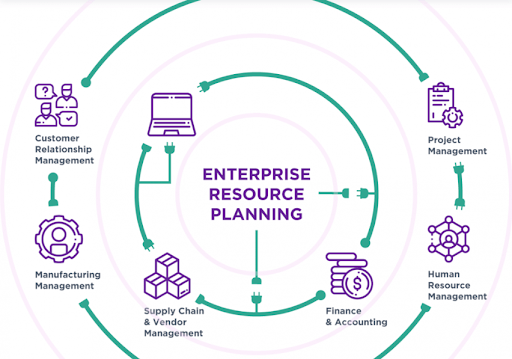
ERP system integration involves linking an ERP system with other software applications, databases, or platforms to create a unified IT ecosystem. This can include integrating with:
- Customer Relationship Management (CRM) systems for synchronized customer data.
- E-commerce platforms to streamline online sales and inventory.
- Supply chain management tools for real-time logistics tracking.
- Business Intelligence (BI) tools for advanced analytics.
- Legacy systems to maintain compatibility with older infrastructure.
Integration ensures that data is shared in real-time or near real-time, eliminating silos and enabling a holistic view of business operations. This ensures seamless data flow across systems. Businesses gain efficiency, accuracy, and faster decisions.
Why Your Business Needs ERP System Integration
In a fast-paced digital world, ERP system integration is the key to staying competitive and efficient. By connecting your Enterprise Resource Planning (ERP) system with tools like CRM, e-commerce, or supply chain platforms, you unlock strategic advantages that drive growth. Here’s why your business needs ERP system integration now, fueled by the core functions of ERP systems:
- Gain a Competitive Edge: Integration unifies data across ERP functions like finance, HR, and inventory, enabling faster responses to market trends. This agility helps you outpace competitors who rely on disconnected systems.
- Future-Proof Your Operations: ERP functions, such as procurement or payroll, generate vast data. Integration with cloud platforms ensures your business scales seamlessly, adapting to new tools or growth without disruption.
- Empower Strategic Decisions: ERP’s real-time reporting, when integrated with analytics tools, delivers a holistic view of your business. Leaders can make bold, data-driven choices to seize opportunities.
- Boost Customer Loyalty: Customer management functions in ERP shine when linked to CRM systems. Integration ensures consistent data, enabling personalized experiences that keep clients coming back.
- Stay Compliant and Secure: ERP’s compliance tools, integrated with regulatory systems, simplify audits and reporting, reducing risks in a complex regulatory landscape.
Synergy Technology Solutions W.L.L. makes this vision a reality. Their highly scalable ERP implementation services and custom modules, especially for Epicor ERP, transform functions like finance, HR, or supply chain into a connected, growth-driven ecosystem. With Synergy’s expertise, your ERP system integration becomes a strategic asset, ensuring efficiency and innovation. Contact Synergy Technology Solutions W.L.L to elevate your business today.
The Use of ERP in Different Industries
ERP system integration changes how businesses work in many industries. It links Enterprise Resource Planning (ERP) systems with tools like CRM, e-commerce, or supply chain software. This creates smooth data flow and boosts success. From retail to healthcare, integration makes ERP fit each industry’s needs. Synergy Technology Solutions W.L.L uses scalable Epicor ERP services and custom modules to connect systems well. Their work helps businesses grow fast and stay ahead.
1. Manufacturing
Manufacturing combines complex tasks into one system. ERP system integration, using cloud-based solutions, joins departments like production and procurement for better teamwork. It streamlines supply chain management, ensures timely delivery to customers, and tracks equipment performance. Research from Aberdeen Group shows 48% of manufacturers say tailored ERP software boosts efficiency.
2. Healthcare
According to a HIMSS Analytics study, 38.4% of healthcare organizations have adopted ERP software. The U.S. healthcare ERP market is projected to grow to $2.1 billion by 2025, with a compound annual growth rate (CAGR) of 5.6%. Beyond streamlining business operations through automation, ERP systems deliver significant advantages for patient care and data management.
- Centralized Patient Data Management: ERP systems unify patient data, like medical history and vaccinations, into one platform, enabling quick access for healthcare staff to improve care decisions.
- Enhanced Data Security: ERP systems use advanced encryption and access controls to protect confidential patient records from unauthorized access or loss.
- Streamlined Regulatory Compliance: ERP systems securely organize documentation, simplifying adherence to strict healthcare regulations and reducing penalty risks.
3. Tourism, Hospitality
ERP systems help tourism companies manage tours, bookings, tickets, and activities with ease, while streamlining visa and vaccine processes. Hotels benefit from efficient staff management, cleaning schedules, appointment tracking, and oversight of restaurants and leisure activities, boosting operations and guest satisfaction.
4. Construction:
ERP systems meticulously monitor project costs, including materials, labor, and equipment expenses, ensuring accurate financial oversight. By integrating with budgeting tools, they provide real-time insights and alerts to keep projects within scope, prevent cost overruns, and maintain profitability.
5. Services:
ERP systems efficiently track client tasks, timelines, and deliverables, streamlining service delivery and project management. Integration with CRM platforms enhances customer service by aligning task progress with client communication, enabling personalized interactions and fostering stronger relationships.
6. Retail Sector
A leading retailer connected its Oracle NetSuite ERP with an e-commerce platform and a CRM system. The integration automated order fulfillment and provided a unified view of customer data, boosting online sales by 25%.
Key Benefits of ERP System Integration
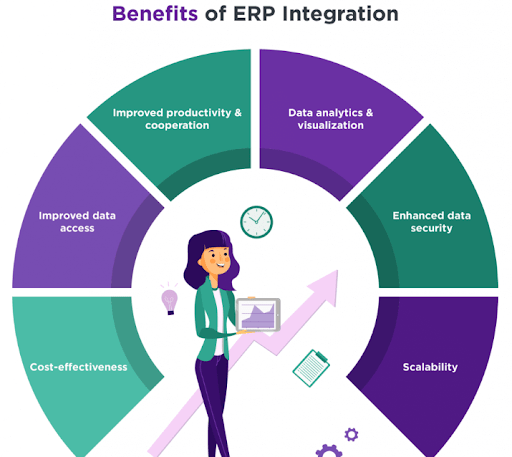
ERP integration transforms how enterprises operate. It connects systems for seamless data flow. Businesses gain efficiency and better decision-making. This process eliminates silos and boosts collaboration. It saves time and reduces errors. With ERP integration, enterprises stay competitive and agile. The following benefits highlight why integration is essential for success.
Improved Productivity & Cooperation
ERP integration streamlines workflows across departments. Teams access shared data in real time. This reduces delays and miscommunication. Employees collaborate better on projects. Automated tasks free up time for critical work. Productivity rises as manual processes decrease. Integration fosters a unified work environment.
Cost-Effectiveness
Integrated ERP systems cut operational costs. They eliminate redundant processes and manual data entry. Businesses save on labor and resources. Fewer errors mean less rework. Cloud-based integrations reduce hardware expenses. Over time, these savings add up significantly. Enterprises achieve more with less investment.
Improved Data Access
ERP integration provides instant access to data. Employees get real-time information from one source. This speeds up decision-making. No more searching multiple systems. Managers track performance easily. Accessible data improves customer service. Teams stay informed and responsive. Integration ensures data is always at hand.
Enhanced Data Security
Integration strengthens data security. Centralized systems reduce vulnerabilities. Access controls limit who sees sensitive information. Encrypted data transfers protect against breaches. Regular updates patch security gaps. Businesses avoid costly data leaks. ERP integration builds trust with customers. It keeps enterprise data safe and secure.
Data Analytics & Visualization
ERP integration enables powerful analytics. Businesses gain insights from unified data. Real-time reports highlight trends and opportunities. Visualization tools make data easy to understand. Managers spot issues quickly. Predictive analytics improve planning. Integration turns raw data into actionable strategies. It drives smarter business decisions.
Scalability
ERP integration supports business growth. Systems adapt to new demands. Adding users or modules is simple. Cloud solutions scale without heavy costs. Enterprises expand without disrupting operations. Integration ensures flexibility for future needs. It keeps businesses ready for change. Scalability drives long-term success.
Challenges of ERP System Integration
ERP integration offers big rewards. But it’s not easy. Companies face complex hurdles. Here are three key challenges and how to tackle them.
1. High Implementation Costs
ERP projects demand heavy investment. They require time and skilled teams. Missteps can inflate budgets fast.
How to Mitigate
- Set Clear Goals: Audit processes before starting. Identify what works well. Pinpoint areas to improve. Define how ERP will help meet business goals.
- Stage the Project: Break implementation into phases. Assign features to each phase. Budget for each step to control costs.
2. System Complexity
ERP systems pack many features. They can overwhelm users. Employees need time to adapt.
How to Mitigate
- Involve Employees Early: Talk to staff during planning. Survey their needs. Ensure the ERP fits their daily tasks.
- Test During Development: Let users try early versions. Gather feedback. Make changes before launch.
- Train After Launch: Offer department-specific training. Teach employees how to use the system effectively.
3. Costly Maintenance
ERP systems need strong performance. They require enough storage and speed. Poor maintenance slows work and hurts productivity.
How to Mitigate
- Analyze Needs: Study your processes deeply. Choose a vendor that matches your needs. Ensure the solution fits your budget.
- Plan for Upgrades: Budget for ongoing maintenance. Select scalable software to avoid future bottlenecks.
With smart planning, these challenges can be managed. A clear strategy ensures smoother integration.
Stages of ERP System Integration
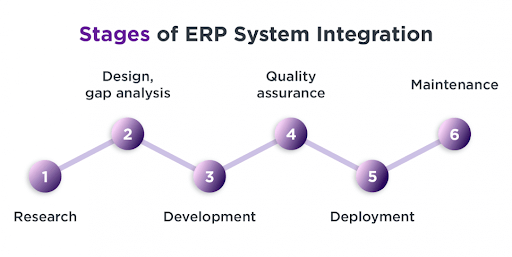
Ready to transform your business with ERP integration? It’s a bold move, but success lies in a clear roadmap. Let’s dive into the six essential stages that make it happen.
1. Research
Every great project starts with research. Build a team to audit your business. Include staff from various departments, project managers, and a C-level leader. Assess current processes. Spot inefficiencies. Define ERP needs. Set clear goals. Consider hiring third-party ERP consultants or choosing a development partner at this stage.
2. Design and Gap Analysis
Now, shape the ERP’s architecture. Work closely with your development partner. Analyze existing processes. Identify gaps and weak spots. Find ways to optimize them. Decide on needed features. Choose whether to customize an existing system or build one from scratch. Involve end-users—they know the processes best and can highlight critical gaps.
3. Development
Time to build the ERP. Develop new features or customize existing software. Integrate with other tools, like CRM or supply chain systems, that stay outside the ERP. Plan data migration carefully. Identify critical data. Extract it from old systems. Clean it to remove duplicates or errors. For on-premise ERPs, set up the data center with the right hardware and software.
4. Quality Assurance
Testing ensures a flawless system. Run multiple tests to confirm performance. Conduct functional testing to check if features meet business needs. Perform performance testing to handle peak loads. Use integration testing to verify compatibility with other software. Start testing early in development. Fix issues quickly. This keeps the system smooth at launch.
5. Deployment
The system is ready to go live. Some companies launch everything at once. Others release high-priority features first, adding more later. Prepare for potential issues. Have a team ready to fix problems fast. Train employees thoroughly. Help them understand the system. Give them time to adapt and boost productivity.
6. Maintenance
Keep the ERP running smoothly. After launch, gather user feedback. Make adjustments. Fix minor bugs. For on-premise systems, plan software updates and hardware upgrades. For cloud-based ERPs, your vendor handles most updates. Ongoing support ensures the system stays efficient and scalable.
These stages pave the way for ERP success. Execute each with care to unlock your business’s potential.
Best Practices for Successful ERP System Integration
ERP integration can be challenging. But the right approach ensures success. Follow these best practices to streamline the process and maximize value.
1. Set Clear Goals
Start with a clear vision. Define what you want to achieve. Improve efficiency? Boost data visibility? Align goals with business needs. Conduct a thorough process audit. Share objectives with your team and vendor.
2. Choose the Right Integration Method
Pick a method that fits your needs. Use APIs for flexible, real-time connections. Consider middleware for complex systems. Explore iPaaS for cloud-based solutions. Evaluate scalability and cost. Select what aligns with your infrastructure.
3. Prioritize Data Quality
Clean data is critical. Standardize formats across systems. Remove duplicates and errors. Set up data governance rules. Test data accuracy during integration. High-quality data ensures reliable results.
4. Involve Stakeholders Early
Engage everyone from the start. Include IT, end-users, and leadership. Gather input on needs and pain points. Build buy-in across departments. Regular communication prevents resistance and aligns expectations.
5. Test Rigorously
Test at every stage. Verify functionality, performance, and integration. Simulate peak loads. Check compatibility with other tools. Fix issues early. Thorough testing ensures a smooth launch.
6. Train Your Team
Prepare employees for change. Offer hands-on training. Tailor sessions to each department’s needs. Provide ongoing support. Help users feel confident. Training drives adoption and productivity.
7. Plan for Scalability
Think long-term. Design a system that grows with you. Choose flexible tools and vendors. Account for new apps or markets. Scalable integration saves time and costs later.
8. Monitor and Maintain
Integration doesn’t end at launch. Track system performance. Gather user feedback. Update software regularly. Address issues fast. Continuous maintenance keeps your ERP efficient.
These practices pave the way for seamless ERP integration. Apply them to unlock your system’s full potential. Synergy Technology Solutions W.L.L follows these steps, offering strong Epicor ERP integration with custom modules. Their skills ensure easy connectivity and growth.
Tools and Technologies for ERP Integration

Seamless ERP integration needs powerful tools. The right technologies simplify connections and drive efficiency. Here are essential tools to fuel your ERP success.
- APIs (Application Programming Interfaces) : Enable fast data sharing. Link ERP to tools like CRM or inventory systems. Scalable and versatile. Choose platforms with strong API support.
- Middleware Solutions: Connect complex systems effortlessly. Bridge legacy and modern apps. Tools like Boomi or Red Hat Fuse excel. Perfect for diverse IT setups.
- iPaaS (Integration Platform as a Service) : Cloud platforms for easy integration. Unify apps quickly. Solutions like Workato or Dell Boomi scale well. Ideal for cloud-based ERPs.
- ETL Tools (Extract, Transform, Load) : Handle data migration smoothly. Pull data from old systems. Clean and format it. Tools like Pentaho or Stitch ensure accuracy.
- Low-Code Development Platforms : Build integrations with less code. Empower business users. Platforms like OutSystems or Appian speed up work. Great for rapid customization.
- Cloud ERP Systems : Come with integration-ready features. Solutions like Microsoft Dynamics 365 or Epicor connect easily. Support APIs and cloud tools. Cut on-premise hassle.
- Data Management Tools : Keep data consistent. Eliminate errors and duplicates. Tools like Collibra or Alation ensure quality. Vital for trusted insights.
- Testing Software : Validate integration quality. Tools like SoapUI test APIs. JMeter checks performance under load. Catch issues before launch.
These technologies make ERP integration smooth. Select tools that fit your goals to transform your business.
Conclusion
ERP system integration transforms businesses. It streamlines processes, boosts efficiency, and drives growth. Success requires clear goals, robust tools, and careful planning. Overcome challenges with testing and training. Embrace scalable technologies for lasting impact. Synergy Technology Solutions W.L.L delivers tailored ERP integration to elevate your operations. With the right strategy, your ERP unlocks endless potential.
Start your integration journey today and power your business forward.
Frequently Asked Questions
1. Is ERP integration suitable for small businesses?
Answer: Yes, ERP integration helps small businesses automate tasks, reduce errors, and scale operations efficiently. Cloud-based ERP solutions offer flexible and cost-effective options tailored to smaller businesses’ needs and budgets.
2. How long does ERP integration take?
Answer: The duration varies based on system complexity and business size. It can take a few weeks to several months. A detailed project plan and an experienced implementation team help speed up the process and ensure success.
3. Can ERP integration be customized?
Answer: Yes, ERP integration can be tailored to meet specific business needs. Custom APIs, middleware, and third-party tools allow businesses to connect unique applications and ensure the system aligns with existing workflows.
4. What is the role of APIs in ERP integration?
Answer: APIs (Application Programming Interfaces) enable communication between ERP systems and other software. They allow data sharing in real-time, making integration more flexible, scalable, and easier to manage across multiple applications.